Vox Stella Download

Astrology software for judgment, timing, and chart research

Cast horary questions, track live chart context in Astro Clock, compare relationships, map relocation options, scan transits, choose election windows, and document forensic or trait-profile work.

The Earth is fixed beneath your horizon and the heavens turn around it, as in Ptolemy’s geocentric model. Set for your latitude, with the Sun at its place in the zodiac today; the sky behind follows the Sun where you are.

Horary

Cast a clear horary in three clicks.

Ask Set Get an Answer

Judgment Engine

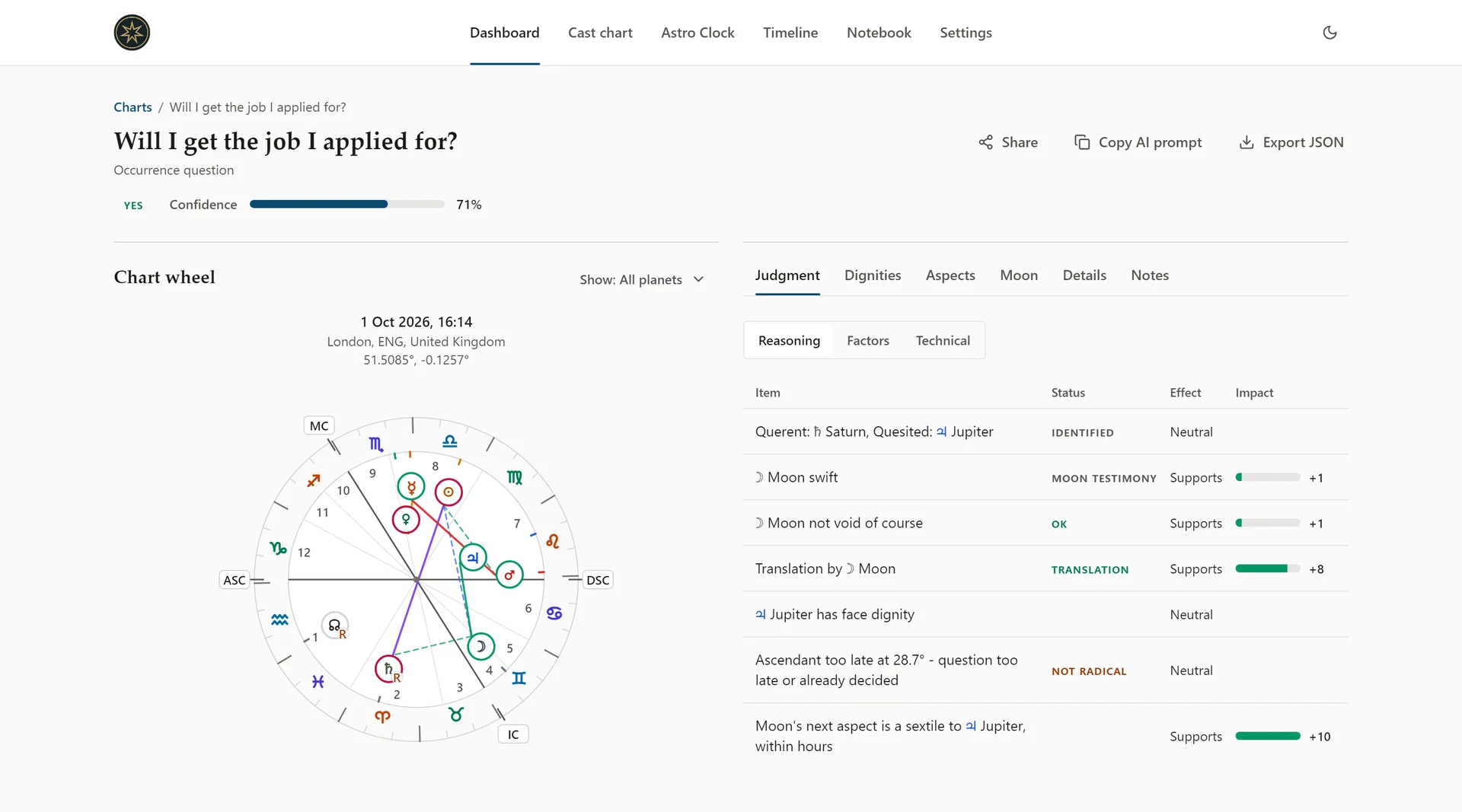
Horary astrology yes/no engine

  • Ask: Type your horary question.
  • Set: Use Now or pick date/time; location auto-detects.
  • Get an Answer: Instant yes/no, confidence, and the reasoning.

Classical method, modern clarity. Learn how horary astrology works.

Vox Stella horary chart for the question “Will I get the job I applied for?”: a Yes verdict at 71% confidence, the chart wheel, and the Judgment tab’s reasoning table of testimonies with their status, effect and impact

Forensic Analysis

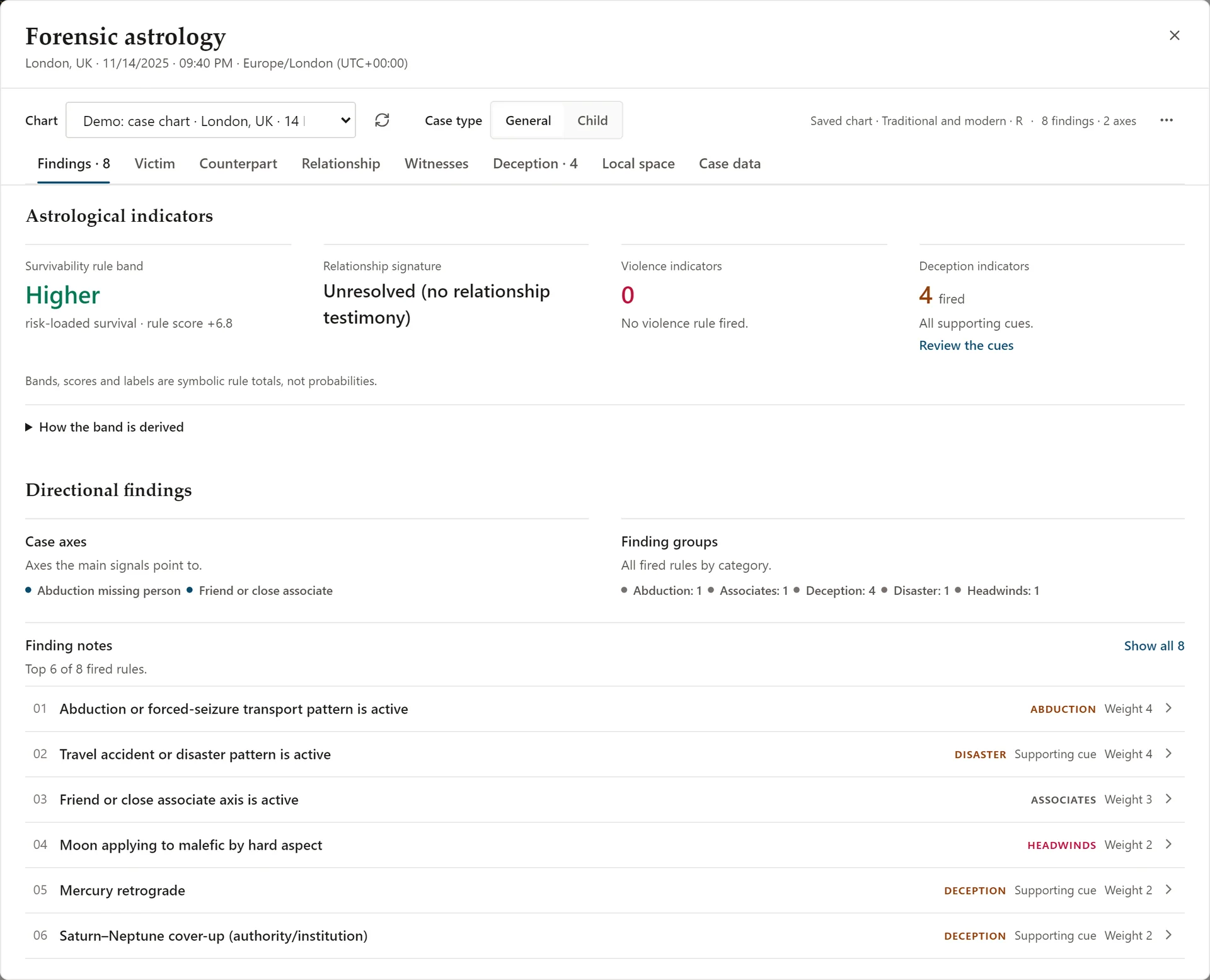
Forensic astrology tools

Direction map, deception patterns, relationship links

  • Relationship Link Tests: rulership links, mutual reception, triplicity, exaltation/fall, terms, and house/aspect connections, scored with classification.
  • Deception Configuration: rule-based indicators with a score and High/Medium/Low level; key flags called out.
  • Local space: symbolic bearings on an abstract compass, with traditional place keywords; never a location estimate.
  • Victim & Perpetrator: ASC, Moon, and co-rulers vs. 7th ruler and co-significators.
  • Witness & Accomplice: Mercury signals with H3/H11/H6/H12 groupings.
  • One-click exports: copy a structured brief or export a PDF report.

Learn more about the Forensic feature or read What Is Forensic Astrology?

Forensic workspace in Vox Stella on a demo case chart: the findings tab with the survivability rule band, relationship signature, violence and deception indicator counts, and the finding notes

Astro Clock

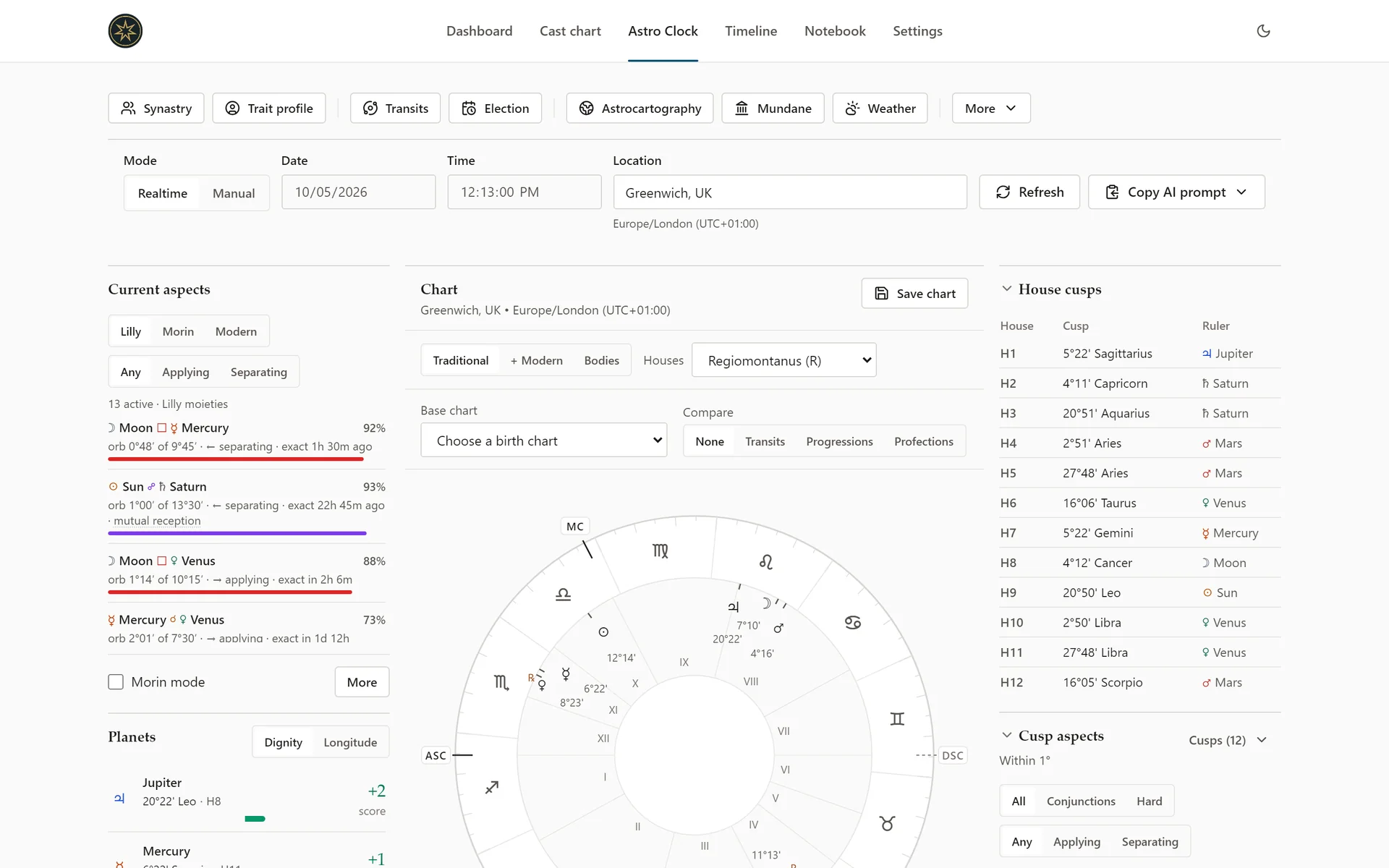
Astro Clock workspace

Live chart context, saved charts, and deeper tools

  • One-view layout keeps the core chart context visible without burying the signal.
  • Live or manual chart context shows positions, receptions, and dispositors at a glance.
  • Saved charts preserve moments you want to reopen or reuse in deeper Astro Clock tools.
  • Date entry: set any moment manually or use Now.
  • Planetary hours, Moon condition and current aspects for the moment on screen.
  • Focused layout keeps the chart readable during longer sessions.

Learn more about the Astro Clock feature or read the Live Horary Dashboard launch post.

Astro Clock workspace: the grouped Tools bar, Realtime and Manual controls with date, time and location, Current aspects with Lilly orbs, the chart, and the house cusps

Synastry

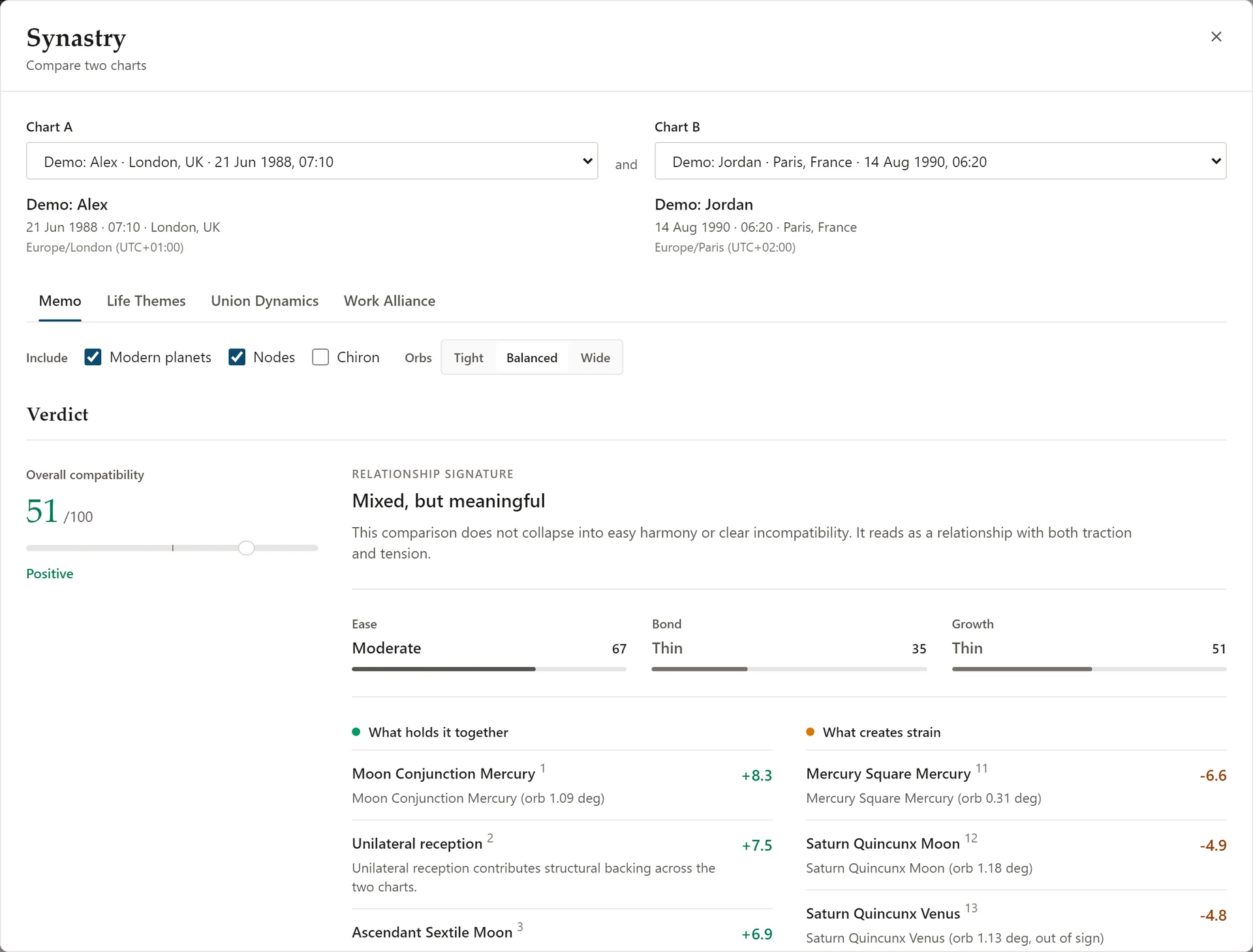
Compare two charts by relationship dimension

Structured compatibility with visible factors

  • Read by dimension: emotion, communication, chemistry, ease, attachment, and growth stay separate.
  • Score bars: scan the overall pattern fast.
  • Visible factors: keep the astrological logic in view.
  • Use it beyond romance: dating, collaboration, and long-term fit.

Learn more about Synastry or read the full feature guide.

Synastry in Vox Stella comparing two demo charts: an overall compatibility score of 51, the relationship signature “Mixed, but meaningful”, Ease, Bond and Growth bars, and what holds the pair together or creates strain

Election Timing

Pick the strongest launch window

Ranked windows with plain-language guidance

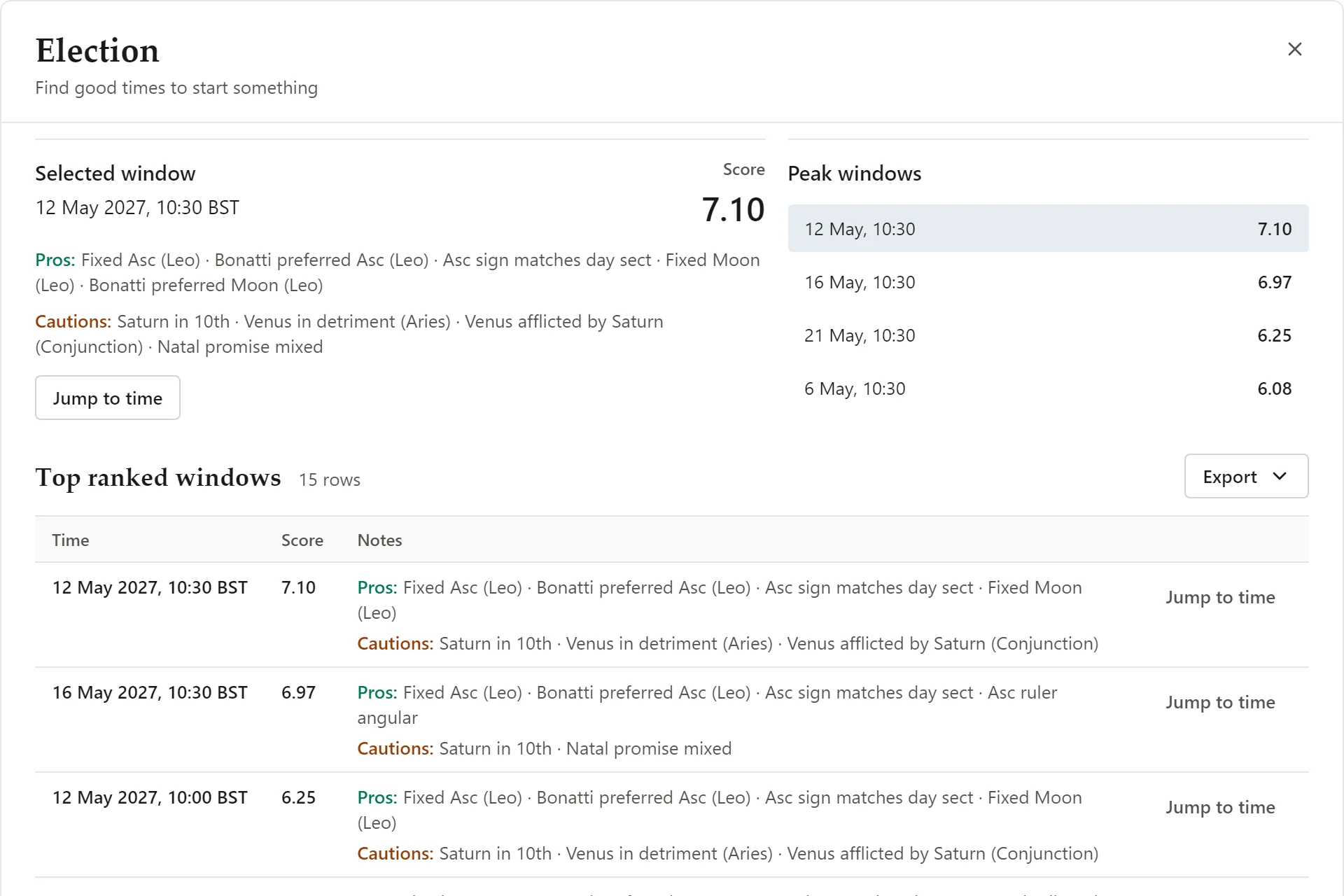
  • Scan Your Window: Define the goal and timeframe; the engine surfaces the most supportive dates.
  • Ranked Results: Each suggestion carries a strength score, highlights, and cautions you can act on immediately.
  • Optional Personalization: Add natal overlays when you want the timing tuned to a specific chart.
  • Viral Election Model: Tap the Viral Election Model for pro scoring, team handoffs, and ready-to-send launch windows.

Learn more about the Election feature or read Wedding Election Astrology Guide: How to Choose a Better Wedding Date for the Marriage workflow.

Election results in Vox Stella: the selected window with its score, pros and cautions, the peak windows, and the top ranked windows table

Astrocartography

Map your strongest places

Location astrology for relocation, travel, and city comparison

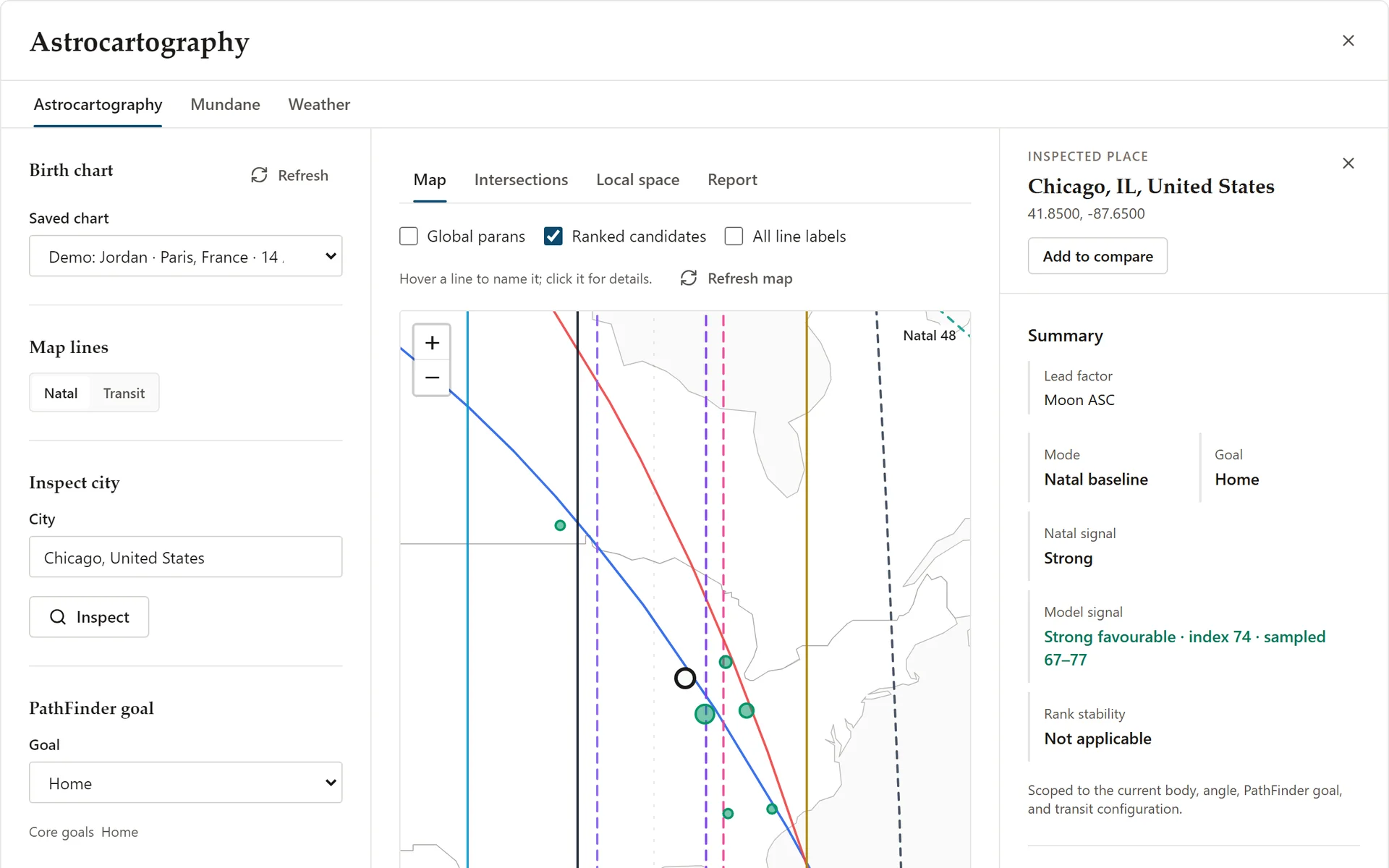
  • Map-first world view with angular planetary lines.
  • Compare cities before you relocate or plan a trip.
  • PathFinder goals for home, love, career, and money.
  • Inspect crossings, local space, and nearby line effects.

Learn more about Astrocartography in the features guide or read the astrocartography and relocation astrology guide.

Astrocartography in Vox Stella: a saved birth chart, the PathFinder goal Home, planetary lines on the map with ranked candidate cities, and the side inspector for Chicago

Take a chart into a wider workflow

Structured exports when you need them

Clean packets for research, writing, and review

Export a structured packet and curated prompt when you want to take a chart into another writing or research workflow. Vox Stella stays the source of truth. Start with the Astro Clock docs hub.

Product

Plans

Find the plan that keeps your charts moving

One app with every feature: own the desktop license outright or subscribe monthly.

Every feature

Vox Stella for Windows

Everything below comes with both ways to buy.

  • Horary astrology: cast and judge questions, with saved question history
  • Astro Clock with live and manual charts and saved charts
  • Synastry, Transits & Trait Profile
  • Astrocartography with PathFinder goals
  • Election Models
  • Forensic analysis toolkit
  • AI-ready exports & PDF reports

Flexible

Monthly Access

$35/ month

Every feature, billed monthly; cancel anytime.

Frequently asked questions

Vox Stella software FAQ

Everything you need to know about Vox Stella astrology software: horary, synastry, astrocartography, Astro Clock, election timing, forensic analysis, trait profile, and reporting.

What is Vox Stella?

Vox Stella is desktop astrology software with separate Horary and Astro Clock workspaces. Horary handles question casting and judgment, while Astro Clock provides the chart context and deeper tools for synastry, transits, election, astrocartography, trait work, and forensic analysis.

Who is Vox Stella for?

Professional astrologers, researchers, and teams who need reliable horary workflows, structured synastry comparison, astrocartography, election timing, forensic astrology analysis, and clean reporting.

What is the Astro Clock feature?

Astro Clock is a separate core Vox Stella workspace. It can follow the live chart or hold a manual chart, then pass that chart context into the rest of the Astro Clock feature tree.

That feature tree includes Saved charts, Current aspects, Transits, Synastry, Election, Astrocartography, Astrocartography PathFinder, Trait Profile, and Forensic.

What is the Synastry feature?

Synastry compares two natal charts by relationship dimension instead of flattening compatibility into one verdict.

  • Separates emotional resonance, communication, attraction, compatibility and ease, attachment and longevity, and growth and purpose
  • Uses score-style bars so the overall pattern is easy to scan
  • Keeps the supporting astrological factors visible behind each section

It is built for a more readable chart comparison than generic sun-sign matching.

What is the Astrocartography feature?

Astrocartography is Vox Stella's location astrology workspace. It plots angular planetary lines on a world map, lets you compare cities side by side, and helps you inspect crossings, local space, and nearby line effects before you relocate or travel.

What is the Election feature?

Election scans any window you choose - weddings, product drops, medical procedures, travel - and scores the most supportive dates in plain language.

  • Ranks each option with strengths, cautions, and quick links into Astro Clock
  • Optional natal overlays personalize the window for clients, teams, or couples
  • The Viral Election Model automates pro-level scoring and hands you a ready-to-share plan

Run a scan, compare the shortlist, and pick the timing that matches your intention with confidence.

What is the Forensic feature?

What it is: Forensic astrology applies traditional horary and event-chart techniques to documented incidents (for example, historical crimes or disappearances) to study how chart symbolism describes time, place, direction, and the people involved. It is a research and teaching tool - not evidence.

How astrologers use it

  • Set up the event chart: Choose the most reliable documented time (such as the first report or discovery), note alternates, and lock the exact location with timezone/DST context.
  • Study the testimony: See how the chart describes direction, distance, and the roles traditionally assigned to houses and planets, with every finding traced to its rule.
  • Compare with the record: Check the symbolic reading against what is documented about historical or resolved cases, and note where it fails.
  • Keep an audit trail: Export findings so readings can be reviewed and criticized.

Ethical note: Forensic astrology cannot identify anyone. Never use it to accuse a person, to direct a search, or in place of law enforcement, legal, or professional judgment. Read more about its methods and limits.

What is the Horary feature?

Horary in Vox Stella casts the chart of your question instantly (Now) or from a manual time and location with precise timezone/DST labeling.

  • Checks perfection: direct, translation, and collection of light
  • Reads receptions, dispositors, and essential dignities
  • Tracks aspects and Moon condition (VoC, next aspect, phase)
  • Maps house rulers and significators for clear roles

Outputs a structured, transparent judgment with confidence and optional Snap saves.

How can I contact you? Can I request new features?

Yes - feature requests are very welcome. We prioritize high-impact ideas and aim to ship them as soon as possible.

Bug or calculation error reports are also appreciated. Please include steps to reproduce and, if relevant, a sample chart (date, time, location).

Contact: voxstella.official@gmail.com