
Vox Stella Build 2.7 is a release about trust: visual trust, workflow trust, and interpretive trust.
The interface is cleaner, but this is not only a visual redesign. Build 2.7 also improves the logic behind the redesigned Trait Profile, so the feature is easier to read and more disciplined about what it shows.
The guiding rule for this rebuild is simple: visible Trait Profile values are now intended to be real. A visible score, count, label, or map should come directly from the chart profile, be derived by a tested formula, or stay hidden until the system can support it honestly.
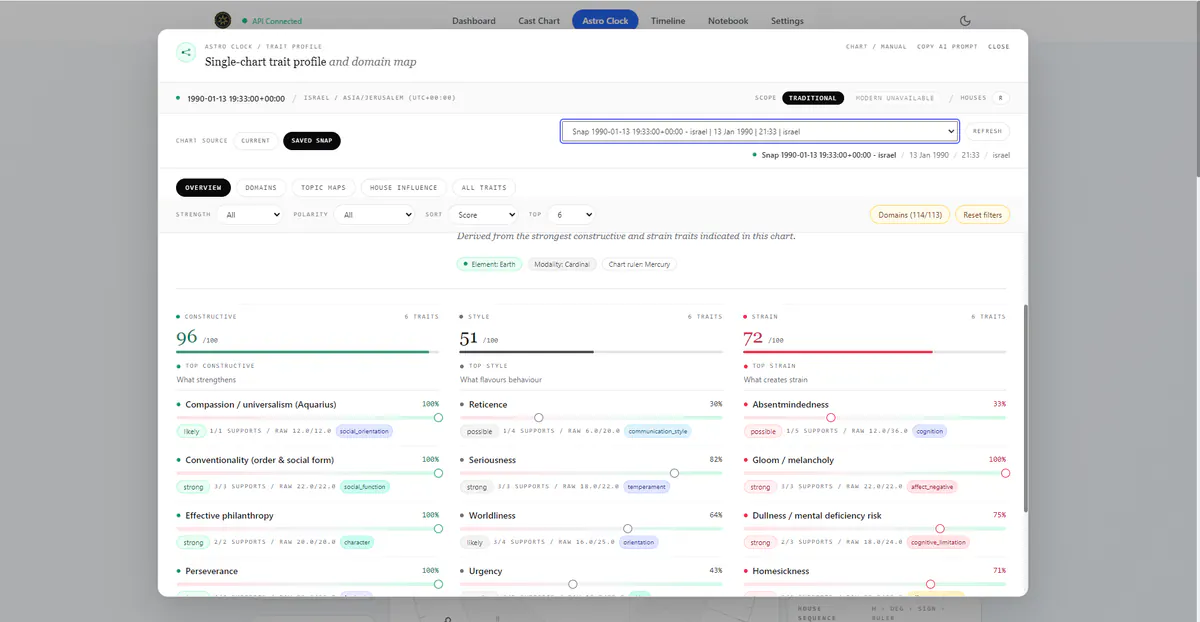
The result is a Trait Profile that is easier to scan, easier to explain, and less willing to display unsupported ornament. Build 2.7 makes the feature feel more like a serious working surface inside Astro Clock.
A Trait Profile That Reads Like a Workspace
The new Trait Profile opens as a wide, focused workspace over Astro Clock. Its visual language now sits closer to Synastry and the rest of the app: quiet chrome, small context labels, pill controls, thin dividers, and a calm analytical surface.
The header makes the reading context clear. It tells the user that this is a single-chart trait profile and domain map, and it keeps the chart context visible near the top: date, location, timezone, chart source, and house system when available.
That context matters. A profile calculated from the live chart should not feel identical to one calculated from a saved natal, event, or manual chart. Build 2.7 makes that distinction easier to see.
The user can also choose between the current chart and saved snaps inside Trait Profile. That means a reader can open Trait Profile, switch to a saved chart, refresh the profile, and continue reading without leaving the modal. For real use, this is a major workflow improvement: people compare saved charts, manual charts, event charts, and research charts, not only the live sky.
The tab structure now follows the way the feature is actually used:
- Overview for the immediate profile summary.
- Domains for trait families and filtered review.
- Topic Maps for life-topic worksheets such as profession and health.
- House Influence for house-by-house routing and strength.
- All Traits for the full underlying trait list.
This is the right kind of redesign: it improves layout and logic without hiding the feature's depth.
The Overview: Constructive, Style, and Strain
The redesigned Overview turns the profile into a readable dashboard. Instead of forcing every trait into one long scroll, it organizes the leading signals into three practical columns: Constructive, Style, and Strain.
Those labels are deliberate. They avoid the blunt moral language of good and bad while still giving the reader a useful structure. Constructive traits show what supports expression. Style traits describe tone, preference, or manner. Strain traits show where the chart suggests pressure, excess, difficulty, or imbalance.
The Profile Balance value is also intentionally named. It is presented as a derived profile-level orientation from constructive and strain signals, not as a claim to measure traditional temperament or validate personality as fact. Build 2.7 does not pretend to have a metric it does not have.
Trait rows now carry more useful context: trait name, score, strength band, supports, raw score, and domain. The bars and compact labels are not decorative. They are tied to the profile output, so a reader can scan quickly but still inspect what is underneath.
Better Logic Behind the Design
Build 2.7 also improves the Trait Profile's internal logic. The goal was to make the visible profile reflect actual chart determinations instead of simply presenting attractive categories.
The strongest change is in how the system handles Morin-style house determination. In plain language, a planet should not be allowed to signify every life topic just because its natural meaning sounds similar. A planet needs a route into the topic, such as house placement, rulership, or contact with the relevant house area.
Before this pass, some planet-area signals could look too confident because they were strong relative to that planet's own map, even when the planet was not especially strong in the chart as a whole. Build 2.7 makes that more balanced by asking two questions together: is this the right topic for the planet, and is the planet strong enough in the chart to carry that topic meaningfully?
This makes the Topic Maps less ornamental. Profession, health, and house-based themes now show channel values intended to come from the chart structure rather than symbolic placeholders.
Topic Maps as Worksheets
The Topic Maps tab is one of the clearest examples of the redesign. Profession and Health are presented as open worksheet columns, not heavy cards. The result feels like an analysis surface rather than a stack of unrelated boxes.
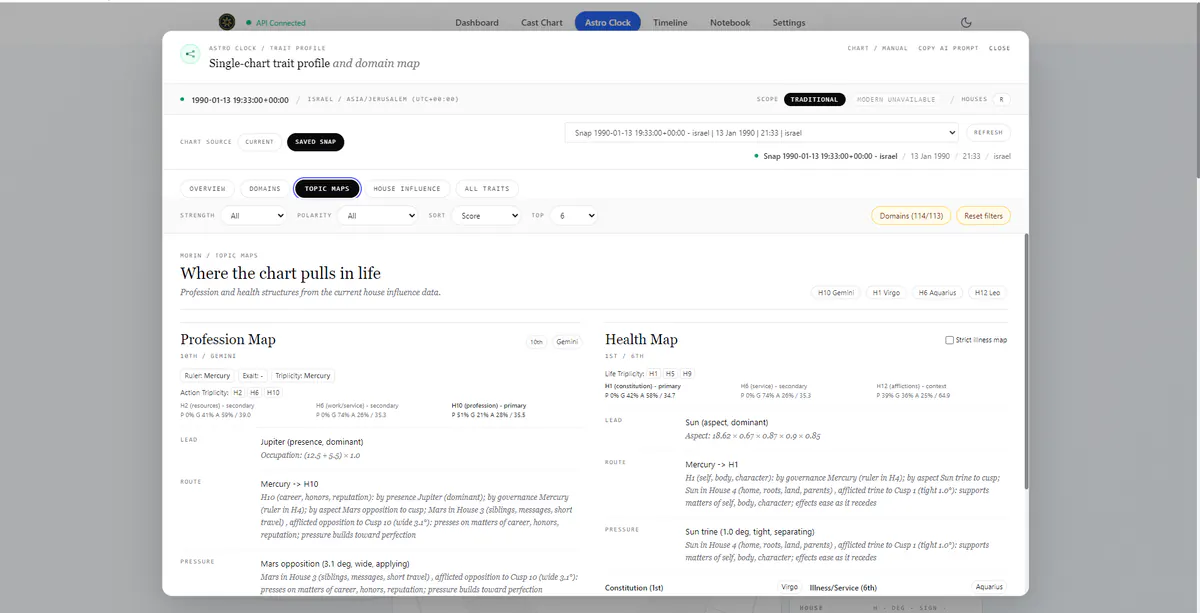
For profession, the map focuses on the 10th-house topic and related action houses. For health, it draws from the 1st, 6th, and 12th house structure. This does not turn Trait Profile into a simplistic prediction machine. It gives the reader a clearer view of how the chart routes life areas.
The House Influence tab follows the same direction. It now reads as an open house-by-house worksheet from House 1 through House 12. Each house can show sign, cusp information when available, influence rows, strength meters, values, keywords, and details.
This layer matters because house influence is one of the bridges between chart structure and interpretation. It is where the product moves from planets existing in a chart to planets being determined toward areas of life.
Benchmarked and Calibrated, Not Proven
A feature like Trait Profile can look impressive while remaining weak analytically. Build 2.7 was therefore checked against an internal benchmark and calibration suite that asks whether the trait engine can surface broad, publicly documented life themes in known charts, and whether house-topic cases show the expected route evidence.
That does not make the logic scientifically proven, and it is not a claim that a chart proves a biography. The better standard is narrower: when the chart and doctrine support a broad theme, can the rule system surface that theme in a repeatable way?
The internal calibration set includes cases for themes such as scientific originality, artistic imagination, public assertion, humanitarian advocacy, and pioneering exploration. It also includes direct house-determination checks, so a learning theme, domestic theme, profession theme, or health theme needs relevant house-route evidence rather than only generic symbolism.
The current internal benchmark passes across 12 cases and 14 checked logic clusters. That gives the release a firmer foundation. It does not mean the trait engine is finished forever. It means the new design is backed by a repeatable review process, and future changes can be judged against something concrete.
Snap Reliability Feels More Direct
Build 2.7 also improves the Snap workflow in user-facing ways.
Some users could experience moments where saving a chart as a snap felt slow, uncertain, or inconsistent in certain chart contexts. That is frustrating because snapping is one of the core Astro Clock workflows. If a user has built a manual chart, checked the wheel, confirmed the time and place, and chosen to save that moment, the app should preserve that chart context directly.
This build makes snapping feel more dependable. When a valid realtime or manual chart is already on screen, the app is better at preserving that active chart context instead of taking a slower or less predictable path.
The release also improves behavior around existing saved charts. Older snaps are intended to remain loadable, and saved chart context should move more coherently through Astro Clock. For users, the practical point is simple: saving and returning to chart moments should feel steadier.
A Better Astro Clock Foundation
Although Trait Profile is the headline feature, Build 2.7 continues the larger Astro Clock direction: keep the chart at the center of the workflow, then let each feature consume that chart context consistently.
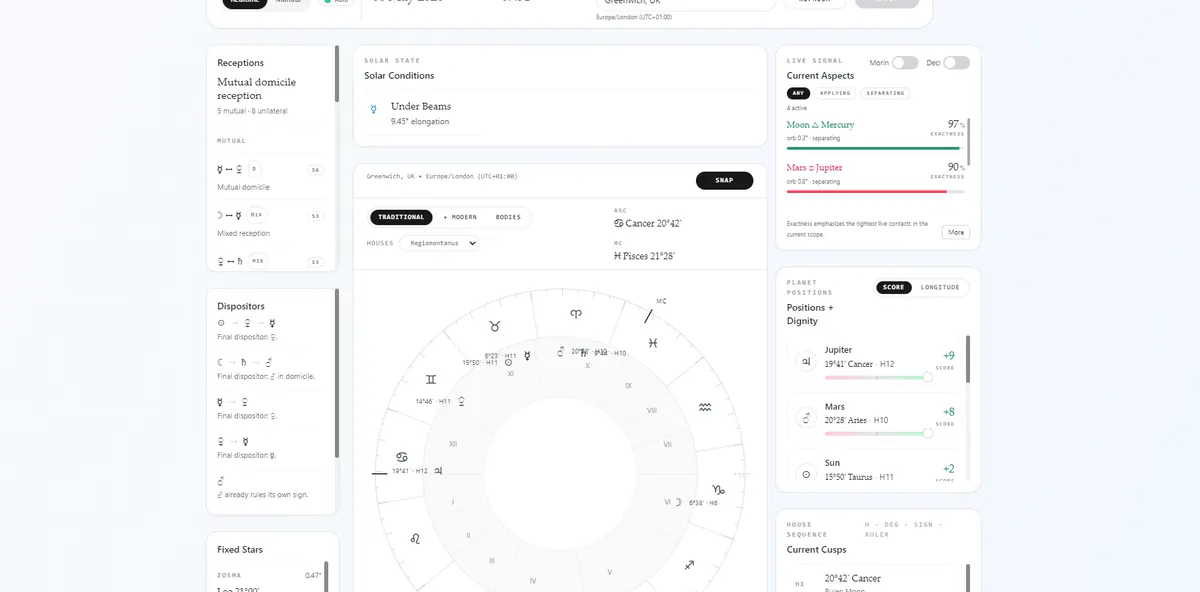
The main Astro Clock interface already presents the live chart, current aspects, planetary dignity, receptions, dispositors, fixed stars, house cusps, and other analytical tiles. The redesigned Trait Profile now feels like it belongs to that same system. It uses the same chart context and the same restrained product language.
This is important for future development. Vox Stella is becoming a set of connected chart workflows. A user should be able to cast a chart, save a snap, open Synastry, inspect Trait Profile, check Transits, explore Astrocartography, prepare Election logic, review Forensic context, or copy an AI prompt without losing the identity of the chart they were working from.
Why Build 2.7 Matters
Build 2.7 is not only a prettier Trait Profile. It is a stronger Trait Profile.
The redesign improves readability. The refactor improves structure. The logic work improves interpretive discipline. The internal benchmarks give the feature a repeatable calibration process. The snap fixes make a core Astro Clock workflow more reliable.
That combination matters. Vox Stella should not simply produce impressive surfaces. It should help the user understand what is visible in the chart, what is derived from tested formulas, and what should stay hidden until the product can support it properly.
For users, that means a better reading experience. For future development, it means a more stable foundation: clearer design, stronger logic, and chart workflows that stay connected.